
Cloud podcast with Zoom and SRT distribution
Outcome
Section titled “Outcome”A Zoom Room will feed a single production instance over NDI. Companion will provide production control, and a small flow engine will distribute the program feed to two SRT destinations.
Signal Flow
Section titled “Signal Flow”flowchart LR
accTitle: Cloud podcast signal flow
accDescr: A Zoom Room sends podcast guests over NDI to a production instance. The production instance sends the program feed over NDI to a flow engine, which distributes it to two SRT destinations. NDI Core supports NDI discovery and Companion controls the production workflow.
zoomRoom["Zoom Room"] -->|"NDI guest feeds"| production["Production instance"]
production -->|"NDI program feed"| flowEngine["Flow engine"]
flowEngine -->|"SRT"| destinationOne["SRT destination 1"]
flowEngine -->|"SRT"| destinationTwo["SRT destination 2"]
ndiCore["NDI Core"] -.->|"NDI discovery"| zoomRoom
ndiCore -.->|"NDI discovery"| production
ndiCore -.->|"NDI discovery"| flowEngine
companion["Companion"] -.->|"Control"| production
Before You Begin
Section titled “Before You Begin”- Confirm Deploy Manager, Instance Manager, and Flow Manager are enabled in the environment.
- Prepare the Zoom Room account, production software, show files, and Companion configuration required for the podcast.
- Obtain the host, port, caller/listener mode, latency, and any Stream ID or encryption settings for both SRT destinations.
- Confirm the production instance, Zoom Room, and flow engine can use the same NDI discovery server.
- Decide whether each destination records the program, streams it onward, or provides a redundant delivery path.
Deployment Plan and Estimated Cost
Section titled “Deployment Plan and Estimated Cost”Use one of each resource. Rates below are the current CLOUDflex hourly usage estimates for these sizes.
| Role | Deploy Manager selection or resource size | Estimated hourly cost |
|---|---|---|
| Production | vMix Instance, prod.small |
$3.50 |
| NDI discovery | NDI Discovery Server, ndiCore |
$0.10 |
| Control | Companion Server | $0.30 |
| Zoom contribution | Zoom Room Instance, zoomroom |
$3.00 |
| Distribution | flowengine.small |
$2.00 |
| Estimated total | $8.90/hour |
The Zoom Room template uses the dedicated zoomroom size. Do not substitute prod.small unless an administrator has validated a different template for your environment.
Deploy the Podcast Resources
Section titled “Deploy the Podcast Resources”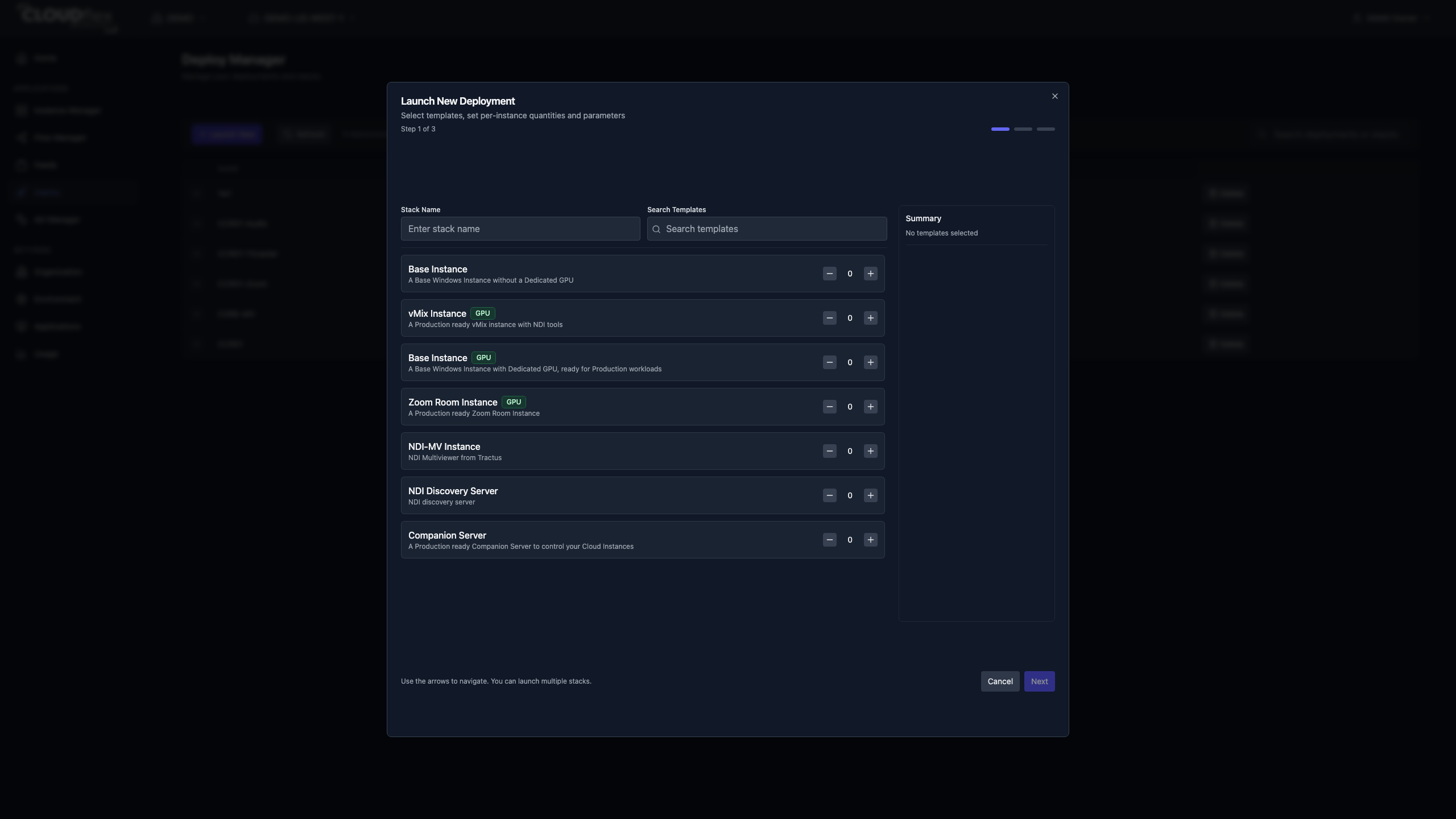
- Open Deploy Manager and select Launch New.
- Enter a stack name that identifies the podcast and production date.
- Add one vMix Instance, one Zoom Room Instance, one NDI Discovery Server, and one Companion Server.
- Set the vMix instance size to
prod.small. Keep the approved template values for the other resources unless the production plan requires a tested override. - Review the deployment summary and select Launch.
- Confirm all four deployed resources are ready in Instance Manager.
- Use the environment’s approved flow-engine provisioning process to make one
flowengine.smallengine available. The current Deploy Manager catalog does not expose a Flow Engine launch template. - Confirm the flow engine appears as ready in Flow Manager before configuring the signal path.
Configure the Production Path
Section titled “Configure the Production Path”- Point the Zoom Room and production instance at the NDI Core discovery server.
- Join the scheduled Zoom session and confirm each required guest feed is available to the production software over NDI.
- Build the podcast layout, audio mix, recording, and return-feed behavior in the production software.
- Configure Companion with only the controls the operator needs during the show, then test every button against non-critical content.
- Send the clean program output from the production instance to the flow engine over NDI.
- In Flow Manager, create a flow on the small engine and add the NDI program feed as its input.
- Add two SRT outputs. Enter the tested connection mode, address, port, latency, and any Stream ID or encryption values for each destination.
- Start the input, both outputs, and the flow.
Verify
Section titled “Verify”- Confirm the Zoom Room, production instance, and flow engine resolve the intended NDI sources without duplicate or stale names.
- Check the guest mix, program mix, return audio, and recording with a test call.
- Confirm both SRT outputs report an active state and each destination receives stable picture and audio.
- Test a controlled guest reconnect and an SRT destination reconnect before show day.
- Review estimated usage after the test and confirm that no unplanned resources remain running.
Shutdown Checklist
Section titled “Shutdown Checklist”- Confirm local and destination recordings are complete and safely closed.
- Stop both SRT outputs, the Flow Manager input, and the flow.
- End the Zoom session and stop the production software cleanly.
- Stop or remove the production, Zoom Room, flow engine, NDI Core, and Companion resources as appropriate.
- Check Instance Manager and Usage for anything left running.
Troubleshooting
Section titled “Troubleshooting”- If an NDI source is missing, verify that each participating machine uses the intended NDI Core address and can reach it on the production network.
- If an SRT output does not connect, compare caller/listener mode, address, port, latency, encryption, and Stream ID at both ends. See SRT settings.
- If Zoom guests hear an echo or program audio returns to the call, review the production mix-minus and Zoom Room return path before changing the distribution flow.
- If Companion does not control the expected system, verify its target address and test the individual connection before relying on show controls.
What’s Next
Section titled “What’s Next”Use the show-day workflow to plan access, preflight checks, handover, and shutdown responsibilities.